
Self-publishing a book means you take on the role a publishing house would normally play. You commission the editing, approve the design, buy the ISBNs, choose the printer and decide when the book goes on sale. That sounds like a lot, and it is. But it becomes manageable once you see it as a sequence, because most of the stress authors feel comes from making decisions in the wrong order.
This roadmap walks through the ten stages we see every successful self-published book pass through, from a finished manuscript to launch day. At the end you will find a checklist you can print and keep beside your desk.
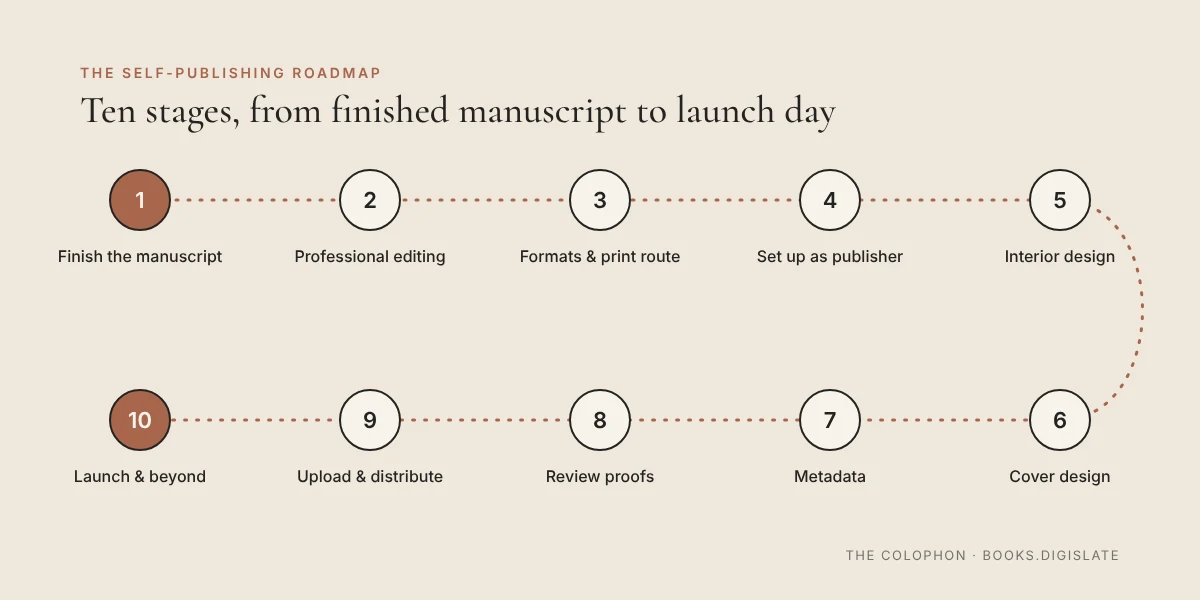
1. Finish the manuscript, then step away from it
A manuscript is ready for the next stage when you have stopped changing the story or argument and started changing only sentences. Before that point, every hour of editing or design is money spent on a moving target.
Once the draft is complete, put it aside for two to four weeks. Then read it through in one or two sittings and fix what you notice. Many authors also share the manuscript with a small group of trusted beta readers at this point, which tells you how the book lands with people who are not inside your head.
2. Invest in professional editing
Editing is the stage authors most often try to shortcut, and it is the one readers notice first. There are three distinct kinds, usually done in this order:
- Developmental editing looks at structure, pacing and argument.
- Copyediting works line by line on clarity, consistency and grammar.
- Proofreading is the final check for typos, done after the book has been laid out.
Not every book needs all three, but every book needs at least one set of professional eyes besides your own. If you are still looking for the right person, our Editors and Ghostwriters page is a good place to start.
3. Choose your formats and route to print
Decide early which editions you are publishing: ebook, paperback, hardcover, audiobook or a combination. Each one has its own files, its own specifications and sometimes its own ISBN.
This is also the moment to decide how the print edition will be produced. Print-on-demand prints each copy as it is ordered, so there is no stock to store. Offset printing produces a full run at once, with a lower cost per copy and more choice of paper and finishes. Your choice shapes the trim size, paper and cover specifications that follow, so it belongs here rather than at the end.
4. Set yourself up as the publisher
As a self-publisher, you are the publisher of record. That usually means:
- Choosing an imprint name to appear on the spine and copyright page.
- Buying ISBNs. In the United States they are sold by Bowker. Some platforms offer a free ISBN, but it can limit where else you distribute that edition.
- Preparing a copyright page and, if you wish, registering the copyright.
Owning your ISBNs keeps your options open if you later change printers or distributors.
5. Design and format the interior
Interior design is what makes a book comfortable to read for hundreds of pages. It covers trim size, margins, typeface, line spacing, chapter openings, running heads and the dozens of small decisions that separate a professional book from a printed word-processing file.
Before your designer begins, it helps to know roughly how long the finished book will be. Our Words to Pages tool turns your word count into an estimated page count for common trim sizes.
6. Design the cover
The cover has two jobs. It must work as a tiny thumbnail on a bookstore website, and it must work as a physical object in someone's hands. A print cover is a single wrap that includes the front, the spine and the back, so it can only be finished once the page count and paper are confirmed.
Spine width depends on both. You can estimate it with our Spine Calculator, then confirm the exact figure with your printer's template.
7. Prepare your metadata
Metadata is the information that travels with your book through retailers and libraries: title, subtitle, author name, description, categories, keywords, price, page count and publication date. Good metadata helps the right readers find the book. Rushed metadata is one of the most common reasons a well-made book goes unnoticed.
Write your book description with as much care as the first page of the book itself.
8. Order and review proofs
Never approve a print edition you have not held. A printed proof shows problems a screen hides: colors that print darker, margins that disappear into the gutter, a spine title that sits slightly off center.
Read the proof slowly, ideally with a checklist, and mark every correction in one place. Then make corrections once, in one round, rather than in a series of small fixes.
9. Upload and distribute
With final files approved, you upload them to your chosen platforms. Many authors use Amazon KDP for Amazon's store and IngramSpark for wider bookstore and library distribution. Each platform has its own file requirements, so expect a final check of your PDFs and ebook file at this stage.
Set your publication date with a little room to spare. Files sometimes need a second review, and you do not want to be fixing a file the day before launch.
10. Plan the launch, then keep going
A launch is not one day but a short campaign: advance reader copies, a few early reviews, an updated author website, an announcement to your mailing list and, if it suits the book, an event. Start planning it while the book is still in production, not after it appears in stores.
After launch, keep an eye on sales, reviews and reader questions. These tell you what to adjust in your description, pricing and, eventually, your next book.
Your self-publishing checklist
- ☐ Manuscript complete and self-edited
- ☐ Beta reader feedback reviewed
- ☐ Professional editing complete
- ☐ Formats chosen (ebook, paperback, hardcover, audio)
- ☐ Print route chosen (print-on-demand or offset)
- ☐ Imprint name chosen and ISBNs purchased
- ☐ Copyright page prepared
- ☐ Trim size and page count confirmed
- ☐ Interior designed and proofread
- ☐ Cover designed with the correct spine width
- ☐ Metadata and book description written
- ☐ Printed proof reviewed and approved
- ☐ Files uploaded and distribution set
- ☐ Launch plan in place
Frequently asked questions
How long does it take to self-publish a book?
From a finished manuscript, most authors should allow three to six months. Editing usually takes the longest. Design and printing move faster once the text is final.
Do I need an ISBN to self-publish?
You need one for most print editions sold through bookstores and online retailers. Ebook requirements vary by platform. We will cover ISBNs in detail in a later article on The Colophon.
Can I publish an ebook and a print edition at the same time?
Yes, and it is usually a good idea. Plan both from the start so the interior and cover can be adapted for each format without starting over.
Not sure which step you are on?
Take our Publishing Quiz. It asks a few questions about your manuscript and points you to the next steps.
Ready to take the next step?
Every book follows this route, but no two take it the same way. If you would like a clear plan for yours, from editing and design to printing and distribution, we would be glad to help. Book a free 30-minute consultation or explore our publishing services.